Augment
A voice layer for the Mac. Press ⌥Space anywhere, talk, and a local Whisper and Llama turn what you said into tidy text, typed straight into the app you were using: a checklist in Notes, Markdown in Claude, one safe line in Terminal. Nothing leaves the laptop.
 Notes
NotesWhere it started
An ear and a brain, glued together by a web page.
The first version was a single HTML file. You pressed Record, talked, and pressed Stop. The page sent the audio to Whisper running on the Mac (the ears), passed the words to Llama 3.1 8B (the brain) to remove the ums and add punctuation, and showed both. Whisper and Llama never spoke to each other; the page was the glue.
Then it became an app
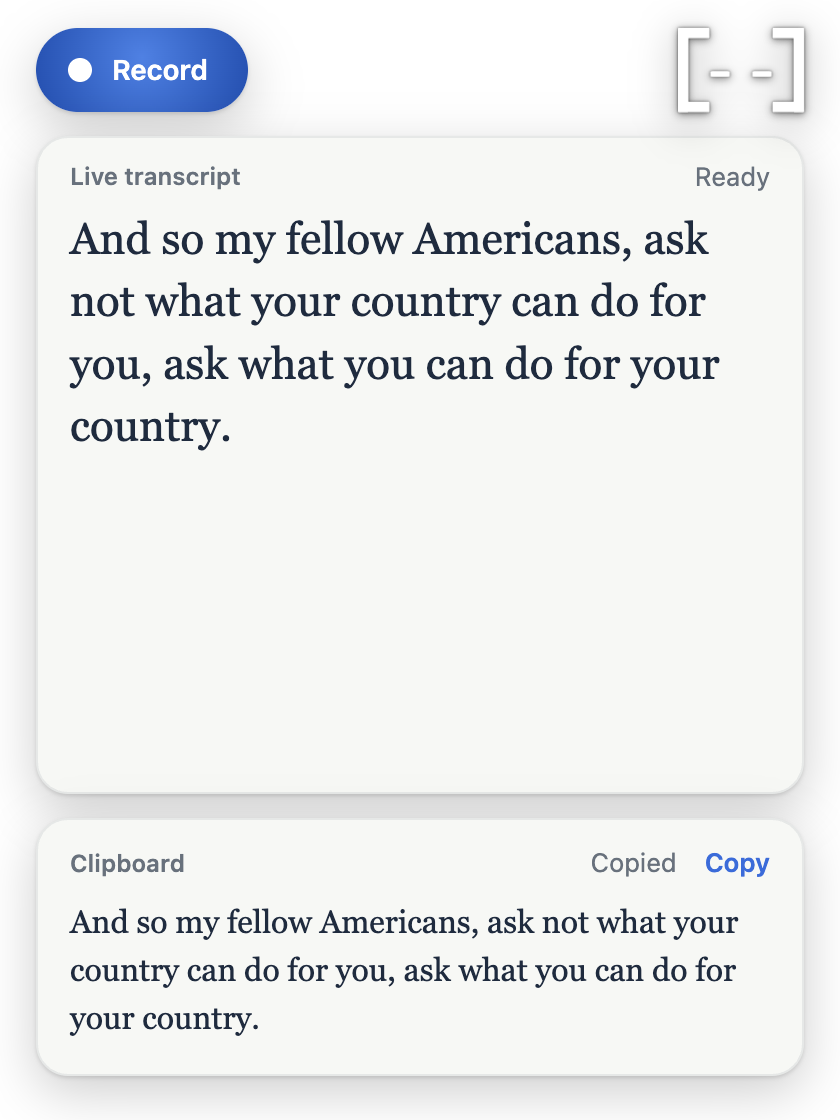
Wrapping it in Electron gave it a global hotkey, a menu bar icon and a window of floating cards: a record button, the live transcript, and what came out the other end. Both servers ship inside the app, Llama starts when you begin talking so it's warm by the time you stop, and it frees its 5 GB after five quiet minutes.
It worked, but it still ended with "now go and paste it". The rest of this project was about removing that last step and everything that made it feel like a tool you visit instead of something that's just there.
Meet Augie
A face made of two brackets and two squares.
Augment needed a way to say "I'm listening" and "I'm thinking" without words, at 28 pixels tall. Augie is the product's name drawn as a face: [··]. Every state is a keyframe animation (seven tracks: the whole body, each bracket, each eye) that I could tune in a small editor built into the app. Move your pointer around: the eyes follow it, and every so often Augie blinks.
Words as you speak
Ink settles as Whisper stops changing its mind.
Whisper doesn't stream; it transcribes a clip. So every 1.5 seconds Augment sends everything said so far and redraws it. Words that came back the same as last time are drawn in full ink; the newest stay light until Whisper stops revising them. You can watch it correct "check list" into "checklist" below. When you stop, one final pass over the whole recording produces the real transcript.
Typing where you are
One note, written the way each app reads.
The clipboard step went first. When you press ⌥Space, Augment notes which app is in front, and when the note is ready it presses ⌘V there for you. Knowing the app turned out to matter for more than pasting: the same checklist has to land differently in each one.
Trip to Paris
Book flights
Renew my passport
Find a pet sitter
## Trip to Paris
- [ ] Book flights
- [ ] Renew my passport
- [ ] Find a pet sitter
To: Sam · Subject: Before we go
Trip to Paris
- ☐ Book flights
- ☐ Renew my passport
- ☐ Find a pet sitter
~ % Trip to Paris Book flights Renew my passport Find a pet sitterBuilt with Notes' own Format menu: a real heading, then a real checklist you can tick.
Markdown, which the chat renders as a heading and a list once you send it.
Rich text: a heading and bullets, with a plain twin for fields that only take plain text.
One line. A newline in a terminal runs a command, so the list is flattened on purpose.
Teaching an 8B model to format
Rails, not a longer prompt.
Formatting meant the model had to decide what's a heading, what's a list and what's just a sentence, and drop the words people use to dictate a list ("first one is", "let's make it a checklist") without dropping anything else. A small model asked to do all of that in one go behaved like one:
- One prompt, Markdown outMade a list once in eight tries, kept "make this a checklist" in the note, and answered "Can you summarise this?" instead of copying it.
- Worked examplesLists improved, but it quietly dropped words ("on the way home", "Hey, just wanted to say") and invented headings from questions.
- Fixed fields, checked in codeLlama fills a JSON shape the server enforces; code removes the spoken instructions first and checks everything Llama returns. Every real dictation I threw at it came out right.
Trip to Paris. Let's make it a checklist. First one is book flights. Second, renew my passport. And the last one is find a pet sitter.
"Let's make it a checklist." is cut before Llama sees it, and becomes a hint instead: kind: checklist
{
  "heading": "Trip to Paris",
  "kind": "checklist",
  "items": ["Book flights", "Renew my passport", "Find a pet sitter"],
  "before": "",
  "after": ""
}Trip to Paris
Book flights
Renew my passport
Find a pet sitter
From floating pill to notch
The pill learned where it lives.
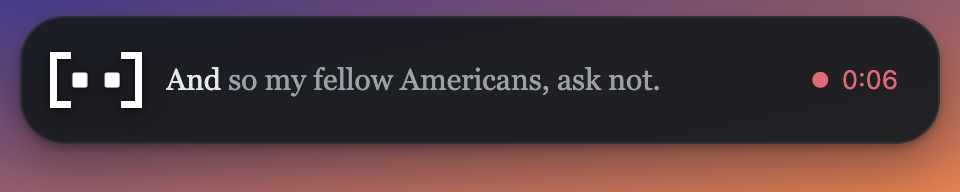
When you start talking from another app, the full window would steal focus. So Augment shows a small pill instead: it never takes focus, mirrors what's happening, and disappears a few seconds after the note lands. Its design changed four times.
- v1
A floating pill
Translucent grey, centred near the top of the screen, sliding in and fading out. It read well over any wallpaper but floated free of everything around it.
- v2
Knowing where it's going
Once Augment knew which app it was writing into, the pill showed that app's icon. The first attempt drew a grey placeholder; macOS only hands over the real icon through Quick Look.
- v3
Out of the notch
Pure black, attached to the top edge, growing out of the MacBook notch and tucking back into it with the same motion reversed. macOS keeps windows below the menu bar, so this one has to ask to sit above it.
- v4
Two rows, one job each
The top is only for Augie and your words; the app and the timer moved to a bar underneath. Words got the full width, so a finished note fits on two lines.
What broke, and what it taught me
Formatting "didn't work", so I tuned prompts. The real cause was in the terminal all along: Electron had changed its clipboard API, and every paste threw before pressing a key. Read the logs before blaming the model.
Notes' checklist shortcut, ⇧⌘L, opened another app's drawer on my Mac. Augment now clicks Format → Checklist in Notes' own menu, which nothing can intercept.
Playing the opening animation in reverse did nothing: Chromium won't restart an animation whose only change is its direction. Closing got its own copy of the keyframes.
A list followed by the same list as a paragraph looked like a double paste. It was Llama repeating the items in "what came after". Code now drops that field when it only echoes the list.
Learnings
Fixed fields and checks in code did what no amount of prompt wording could. The model decides what goes where; code makes sure it's sane.
Every fix came from a real dictation: "item number one is going to be", "this is going to be a checklist". Tidy sample sentences hid all of it.
The app you're in, its own menus, the notch. The more Augment borrowed from the Mac, the less it felt like a separate tool.
Three of the four worst bugs were platform changes, not design or model problems. Proof beats assumptions, every time.